
How to Search Cases by Name
Kansas Courts CaseSearch is the statewide portal that carries Wichita County District Court case information. One name can pull up several people, roles, or counties. So start broad. Catch spelling variants first. Then narrow the Wichita County results by case type, filing date, status, or judicial officer where the live portal offers that filter.
- Open CaseSearch and accept its terms for permitted public case information.
- Choose Wichita County in the Court or location selector, then choose party name or the closest available search type.
- Enter the name in the format the current interface requests. Try a spelling or “Sounds Like” option if a reliable first search fails.
- Add a narrow filing-date range or case-type filter when known, complete the human check, and submit.
- Compare the public case number, court, filing date, type, judge, status, and newest event before treating a name as the intended match.
The portal offers a date-of-birth field as a search control. That makes it a matching aid, nothing more. Do not record or republish someone's DOB just because the form accepts it.
Wichita County CaseSearch Fields
The current CaseSearch interface and the official Smart Search guide describe the fields. Some of the lists are dynamic. They fill when the portal loads. Case-type, status, judicial-officer, and Court options shift over time. Read those values straight from the live portal instead of trusting a fixed list.
| Field label | Type | Required | Options or notes |
|---|---|---|---|
| Terms / Accept | Consent | Yes | Accept the public-access terms to proceed. |
| Court | Dropdown | Unspecified | Select Wichita County when shown. |
| Search Type | Dropdown | Yes in substance | Name, case number, citation, attorney, business, judicial officer, cross-reference, nickname, and Smart Search are documented. |
| Search Term | Text | Yes | Enter the value that matches the selected type. |
| Case Type | Dropdown | No | Dynamic list; do not assume Wichita-specific values. |
| DOB | Date/text | No | Use only when needed to distinguish results. |
| File Date From / To | Date fields | No | Narrows the filing window. |
| Additional Search Filters | Expandable | No | May expose status or judicial-officer choices. |
| CAPTCHA | Human check | When challenged | Complete before search. |
| Register / login | Account control | Migration-dependent | The older guide says registration; the current guest view exposes basic access. |
The live interface captured for the manifest comes from the hosted CaseSearch application.
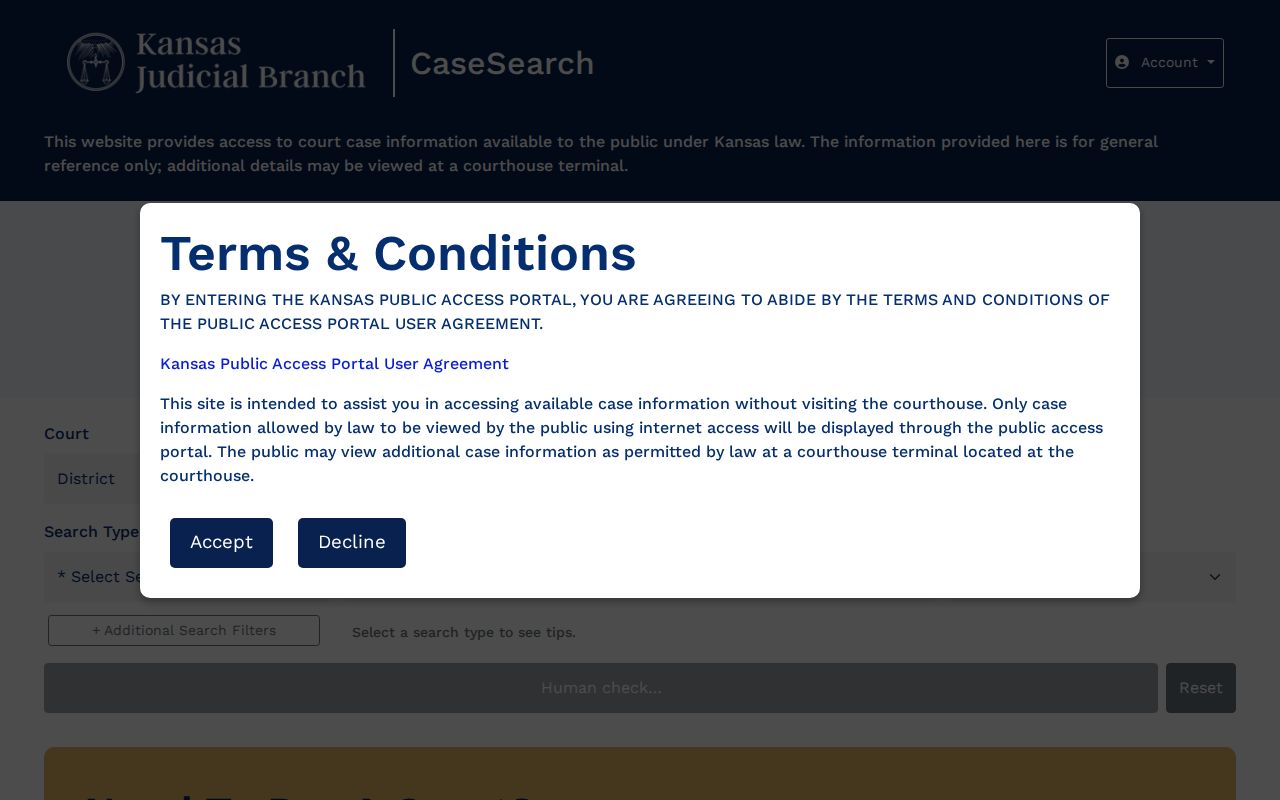
Field labels can change, and the live portal's wording should always win over older instructions.
How to Search by Case Number
For a Wichita County case lookup, a case number is usually the narrowest key. Pick "case number" as the search type. Enter the identifier exactly as it appears on your latest court notice. The legacy Kansas guide offers sample forms like 2019CV25 and RL2019CV25. Those samples show that a prefix may appear. Not every Wichita County number follows either exact pattern. Try the printed number first. If the portal rejects its spacing or punctuation, strip only the formatting marks. Keep every letter and digit. Never invent a year, county code, or case-type code. A failed format might mean portal migration. It could also mean a different venue, an older converted record, or a typo on your copy.
Best first input: Use the complete case number from a clerk notice before a broad party-name search.
Wichita County Search Type Options
The official guide supports more than a party-name query. Search Type tells the portal what kind of term you are feeding it. Pick the wrong type, and you can get nothing back even when the case is fully public.
- Case number
- The court-assigned identifier and usually the most precise choice.
- Citation number
- A number tied to a citation when the district case is eligible for that search.
- Attorney name or bar number
- A search tied to counsel shown in public case data.
- Business name
- A party search for an entity rather than a person.
- Judicial officer
- A judge-based search where the current interface exposes it.
- Cross-reference or nickname
- Alternate identifiers documented in the older Smart Search guide.
Case Type and Case Status are filters, not replacements for the search term itself. Their values change over time. Reset clears the form, and the human check just confirms a person is at the keyboard.
What a Case Search Shows
A Wichita County case result can show a case header plus a chronological index of events, often called a register of actions. It may confirm a filing or order exists without showing the document image. That depends on the case category, public-access rules, and whether older material was converted for the web.
| Case number | The court identifier used for the narrowest follow-up search. |
|---|---|
| Filing date | The date the case or filing was accepted into the record. |
| Court and case type | Wichita County location and a public classification such as civil, criminal, probate, or traffic. |
| Judge and status | The assigned judicial officer and broad case state when public. |
| Caption or parties | The public case style and party roles, subject to access limits. |
| Events index | Dated filings, service, settings, orders, pleas, judgments, or dispositions. |
| Document indicator | A sign that a public image may be available, not a promise of every filing. |
The newest event may carry the current court date. Remember that an online result is not a certified Wichita County court record. A status label alone never explains every order or outcome in the file.
Wichita County Portal Migration
Kansas launched its current CaseSearch layer in 2025, after an earlier public-portal system. The surviving 2025 Smart Search guide says registration is required. Yet the current interface gives guests basic case information. That conflict is a migration clue. It is no basis for promising permanent guest access or a fixed login rule. Follow the live portal's terms and controls. If registration, CAPTCHA, or a changed selector blocks your search, the Wichita courthouse terminal remains a valid way in. The clerk's office does too. The portal publishes no fixed result limit, export feature, bulk-data subscription, or nightly update time. Note: Portal controls change. So a failed guest session does not mean the Wichita County clerk lacks the case.
County vs Statewide Case Search
Kansas CaseSearch serves as both the statewide portal and the online route into Wichita County District Court records. No separate county database offers anything deeper on the web. The real second level is local. It starts with the public computer in the courthouse law library. Then come the clerk's counter and record-request channels.
| Channel | Coverage | Best use | Limit |
|---|---|---|---|
| CaseSearch | Public Kansas district cases statewide | Start by name, number, citation, or another supported type | Not every case or document appears online |
| Wichita courthouse terminal | Permitted District Court material | Older converted documents and deeper local inspection | Nonpublic rules still apply |
| District Court clerk | Wichita County District Court records | Clarify venue, request copies, or confirm the record | Specific requests and fees may apply |
| Leoti Municipal Court | City ordinances and municipal traffic | City cases not found in District Court search | No public online city lookup located |
The official District Court Records access explanation spells out the difference between the portal, the courthouse terminal, case information, and filed records.
That distinction matters. A web search can show an event while the document itself stays available only through another lawful channel.
When Wichita County Search Fails
A blank result has many possible causes. The spelling may differ, or the Court selector may sit outside Wichita County. The case might belong to Leoti Municipal Court or a federal court. An older file may simply lack web documents. Sealed, expunged, juvenile, and other restricted matters may be absent or limited too.
- Try the exact case number, then a spelling or format variation and the narrowest known date range.
- Confirm Wichita County and the correct case type. Read the court name on the notice or citation.
- Use the law-library public computer at 206 S 4th Street during the clerk's published 8 a.m. to noon and 1 p.m. to 5 p.m. hours.
- Call the Clerk of the District Court at 620-260-2560 or visit the counter. Telephone, in-person, written, and fax requests are documented.
- For a specific existing record, use the Rule 1-03 custodian and Kansas court-record KORA form. State the case number, date, type, and document sought.
Local policy allows requests by mail and fax. The Wichita clerk offers no official email or drop-box channel for records. The Kansas eFiling portal handles authorized filings, not public case lookup, and the Central Payment Center is not a full docket viewer.
Wichita County Venue Comes First
Start your search in the right place. Wichita County District Court keeps the state criminal docket. Civil filings, domestic and probate cases, and juvenile matters sit there too. So do small claims, evictions, traffic tickets, and magistrate hearings. Leoti Municipal Court and the federal system are separate courts with no shared search box. A Leoti ordinance ticket stays with City Hall unless the citation itself names District Court. Federal cases go through PACER and the federal clerk instead.
One more routing note saves time. The elected Wichita County Clerk handles government records like elections and budgets, not the court register. The docket clerk is Andrea Barreras, Clerk of the District Court. Her office keeps the District Court record. Sending a case lookup to county administration only slows it down. When a missed hearing or travel is in play, do not trust one setting alone. Check it against the Wichita County court dates workflow.
Restricted Cases and Access Rules
Not every docket entry is public. Kansas Rule 22 lets courts exclude or limit sensitive records, and Wichita County follows it. Adoption files, child-in-need-of-care and juvenile-offender cases, expunged matters, grand-jury material, parentage cases, and protection-order files may be hidden or trimmed under the controlling rule and statute. Rule 106B adds its own limits on personal identifiers. It also treats public electronic copies as nonofficial.
So a restricted result can look like a missing case, a bare header, or a docket event with no document attached. The courthouse terminal will not get around these rules. Ask the clerk what lawful access fits your case and your role as a requester. Keep unnecessary personal identifiers out of any open request.
Access level matters. Public web information, courthouse-terminal access, a plain copy, and a certified copy are different products.
The originating clerk can confirm which form of the Wichita County record is available and what fee applies.